

The problem Pullbase solves
Managing servers manually doesn’t scale:- SSH into each server to make changes? Slow and error-prone.
- Write shell scripts to push changes? Hard to track what changed and when.
- Use Ansible/Chef/Puppet? Complex setup, push-based model, firewall headaches.
Who is Pullbase for?
Pullbase is built for teams managing Linux servers — VMs, bare-metal, or cloud instances:System administrators
Managing fleets of web servers, database hosts, or application servers
DevOps engineers
Who want GitOps benefits without Kubernetes complexity
Platform teams
Standardizing configuration across environments (dev, staging, prod)
Small teams
Who need infrastructure automation without dedicated tooling expertise
What Pullbase manages
Define your desired state in a simpleconfig.yaml:
config.yaml
- Packages are installed, upgraded, or removed (apt, yum, dnf, apk)
- Services are running, stopped, enabled, or disabled (systemd, supervisor, OpenRC)
- Files have the correct content and permissions
How it works
1
Define desired state in Git
Create a
config.yaml in a Git repository. This is your source of truth.2
Connect your servers
Install the Pullbase agent on each server. The agent authenticates with the central server.
3
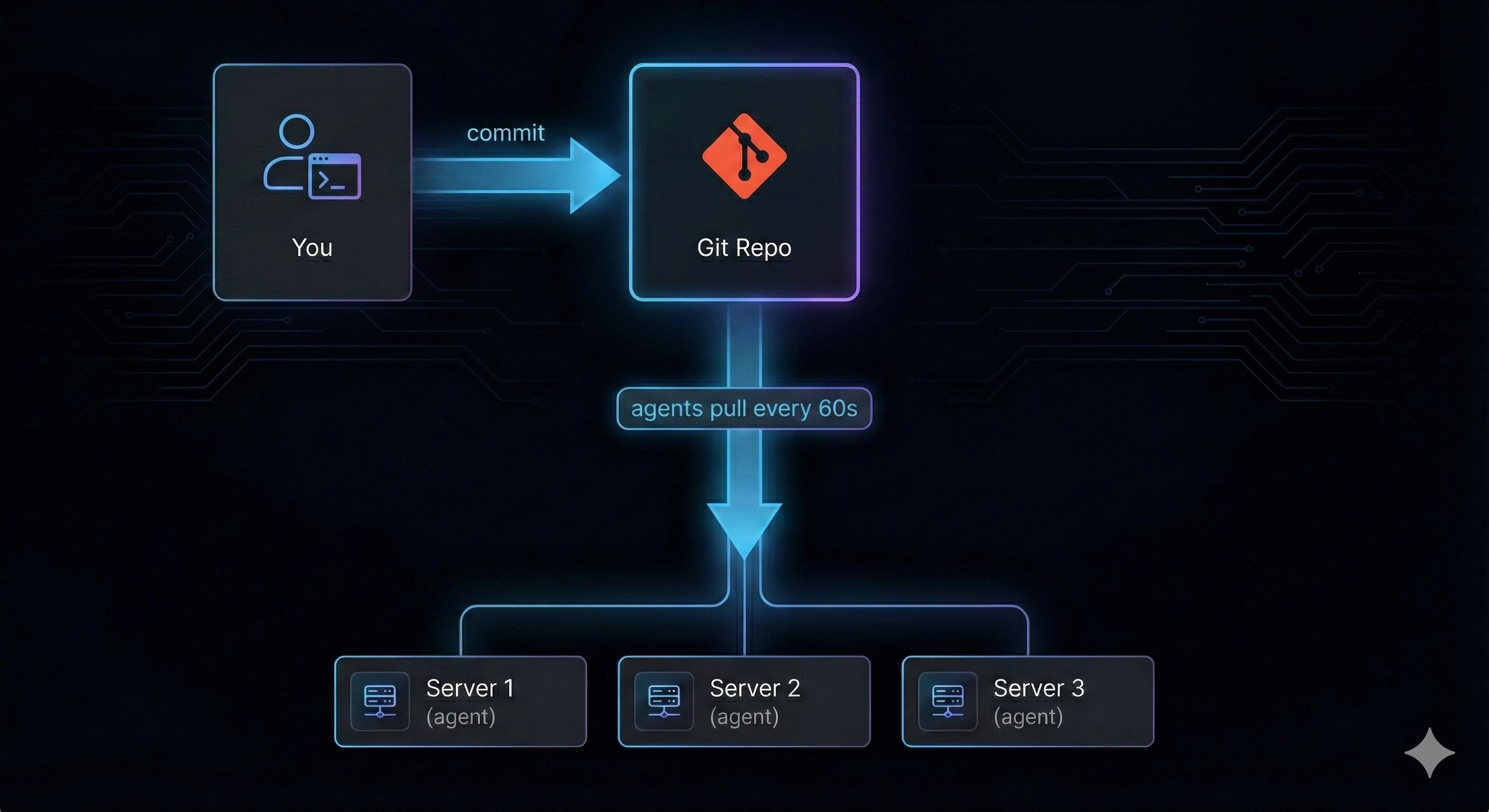
Agents pull and apply
Every 60 seconds, agents check for changes. When the Git repo updates, agents pull the new config and apply it.
4
Monitor from the dashboard
See which servers are in sync, which have drifted, and review the history of changes.
Key features
What Pullbase is NOT
To set clear expectations:- Not for Kubernetes. If you’re running containers on K8s, use ArgoCD, Flux, or similar tools designed for that ecosystem.
- Not a CI/CD pipeline. Pullbase manages runtime state, not build artifacts or deployments.
- Not a container orchestrator. It manages what’s on your servers, not container scheduling.
- Not a monitoring tool. It reports status, but doesn’t replace Prometheus, Grafana, or your APM.
Pullbase vs. other tools
Pullbase is intentionally simpler. If you need complex orchestration, conditionals, or multi-step workflows, Ansible may be a better fit. If you want straightforward “this is what my server should look like” enforcement, Pullbase gets you there faster.
Architecture overview
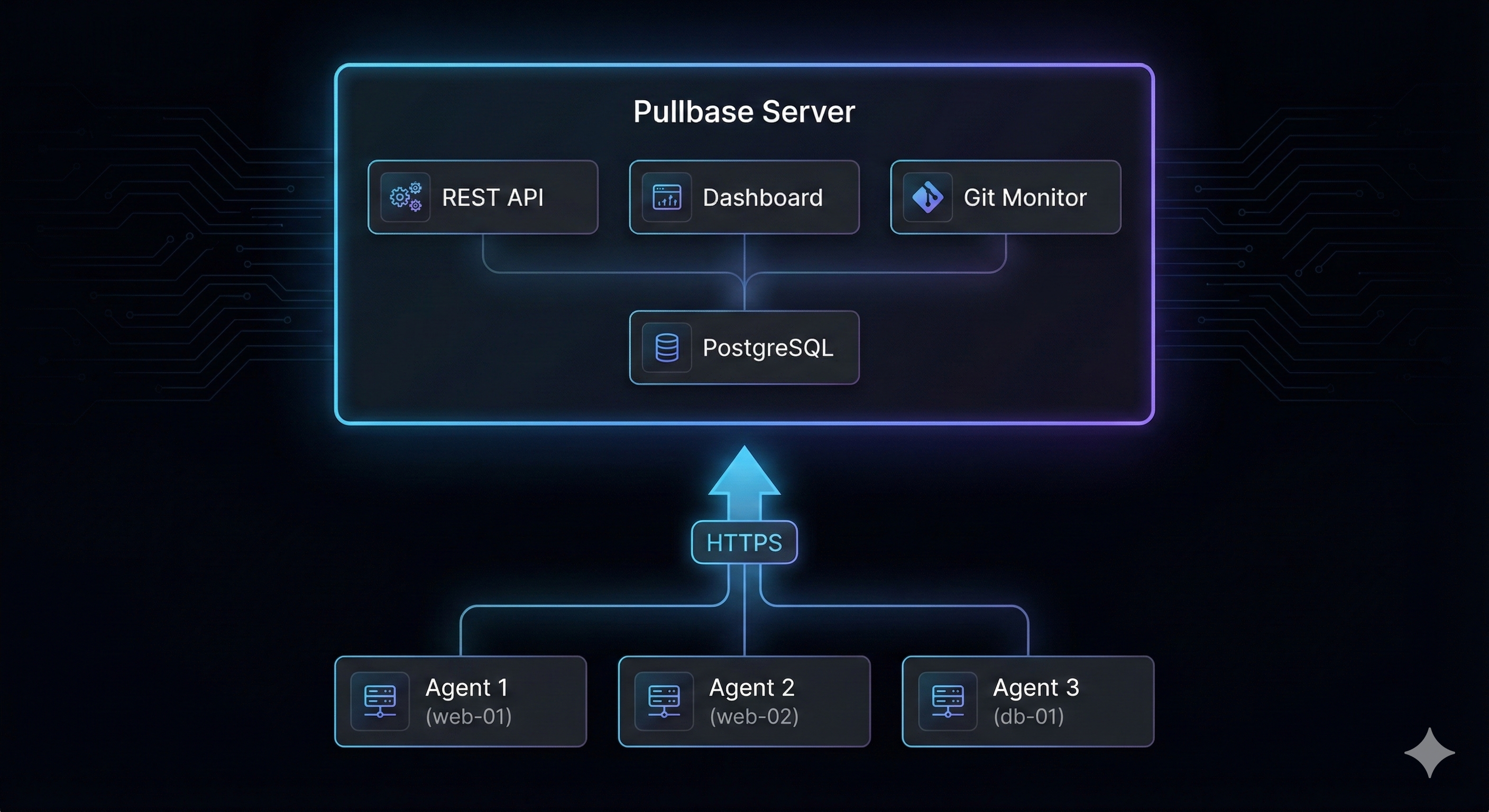
- Server: Central coordination, API, dashboard, Git monitoring
- Agents: Run on each managed server, pull config, apply state, report status
- Database: SQLite (default) or PostgreSQL — stores environments, servers, status history, audit logs
- Git repository: Your source of truth for desired state
Next steps
Quickstart
Get Pullbase running and manage your first server in 5 minutes
Core concepts
Understand environments, servers, agents, and how they work together
Architecture deep dive
Learn how the server, agents, and Git repository stay in sync
Configuration reference
Full reference for config.yaml — packages, services, files, and more