> ## Documentation Index
> Fetch the complete documentation index at: https://docs.pullbase.io/llms.txt
> Use this file to discover all available pages before exploring further.
# Architecture Overview
> See how the Pullbase server, agents, database, and Git repositories work together.
Pullbase orchestrates Git-driven configuration for traditional servers. Agents pull desired state from the central server, apply it locally, and report the results.
## Components
Go application that exposes the REST API, web UI, and webhook endpoints. It manages environments, servers, tokens, audit logs, and status history.
SQLite (default) for zero-config deployment, or PostgreSQL for scale. Stores configuration and operational data. Migrations run automatically on startup.
Lightweight binary that authenticates with a scoped token, clones the config repo, reconciles packages/services/files, and reports drift.
Contains `config.yaml` files. Environments point to a repo, branch, and path. Pullbase reads Git to compute the target commit hash.
## Server internals
* **HTTP stack:** REST APIs with middleware for authentication, CSRF protection, structured logging, and request tracing.
* **Data access:** Database repository layer (SQLite or PostgreSQL) that stores environments, servers, tokens, rollbacks, users, and audit history.
* **Git monitor:** Watches repositories for new commits via webhooks or polling and keeps the environment target commit current.
* **Webhook router:** Validates HMAC signatures, queues events, and updates environment target commits immediately.
* **Audit logging:** Actions like user creation, token issuance, and rollbacks are persisted for later review.
## Agent internals
The agent is built with pluggable package and service managers:
**Package managers (auto-detected):**
* APK (Alpine Linux)
* APT (Debian, Ubuntu)
* YUM/DNF (RHEL, CentOS, Rocky Linux, Fedora)
**Service managers (auto-detected):**
* systemd (most modern distributions)
* supervisor (Docker containers, custom setups)
* OpenRC (Alpine Linux, Gentoo)
The `system.serviceManager` field in `config.yaml` can override auto-detection when needed.
## Agent workflow
1. Fetch public server info from `GET /api/v1/serverinfo/{serverID}` to get Git configuration.
2. Authenticate with `AGENT_TOKEN` and fetch full server info via `GET /api/v1/agent/serverinfo`.
3. Obtain a Git credential via `GET /api/v1/agent/git-token` if the environment uses a GitHub App.
4. Clone or update the repository under `/etc/pullbase/repo`.
5. Parse `config.yaml` and reconcile packages, services, and files using the detected managers.
6. Post a status update to `PUT /api/v1/agent/status`, including commit hash, drift flag, and error messages.
## Data flow overview
```text theme={null}
Git commit -> Webhook/polling updates target commit -> Agent polls server info -> Agent applies state -> Agent posts status
```
* Merging a commit triggers a webhook (or is detected via polling).
* Pullbase stores the new `deployed_commit` for the environment.
* Agents poll on a fixed 60-second interval (configurable via `PULLBASE_GIT_POLL_INTERVAL`).
* Agents reconcile to the new commit and report status history entries.
* Operators review drift, roll back, or adjust configuration via Git.
* Notification webhooks fire for drift or apply errors (when configured).
## Network architecture
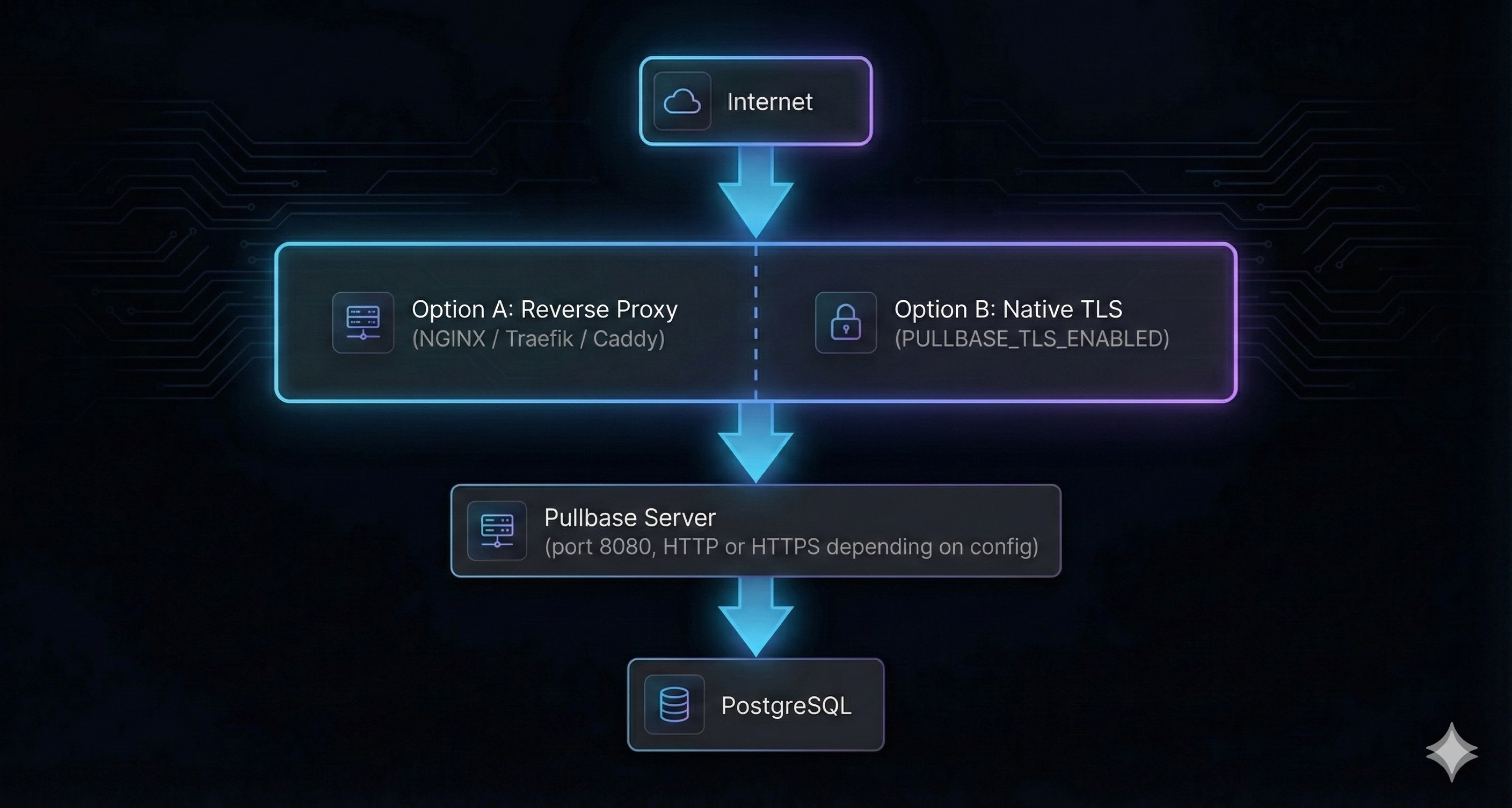 Pullbase supports two TLS approaches: (A) reverse proxy termination, or (B) native TLS via `PULLBASE_TLS_ENABLED=true`. For production, always use TLS. Agents connect to the HTTPS endpoint regardless of which approach you choose.
## Scaling considerations
* **Single-node:** SQLite is the default — no external database required. Perfect for single-instance deployments.
* **Production scale:** Switch to PostgreSQL (`PULLBASE_DB_TYPE=postgres`) when you need high availability or manage hundreds of servers.
* **High availability:** Run multiple Pullbase replicas behind a load balancer (requires PostgreSQL). Sessions are JWT-based and stateless.
* **Networking:** Agents require outbound HTTPS to the reverse proxy and Git provider. Pullbase requires outbound HTTPS to Git provider (for GitHub Apps and webhooks).
## Rollback mechanics
* Rollbacks (`POST /api/v1/environments/{id}/rollback`) create a record, set the environment's deployed commit to the selected hash, and notify agents on their next poll.
* Agents revert state to the specified commit. Package downgrades rely on package manager capabilities; test in staging before production rollbacks.
## Observability hooks
* **Logs:** Central server logs are structured (JSON when configured). Agents log reconciliation details at info/debug levels.
* **Health endpoint:** `/api/v1/healthz` returns status and service name.
* **Future metrics:** Prometheus metrics are on the roadmap; integrate container logs with your monitoring pipeline meanwhile.
Understanding these components prepares you for installation, environment management, and operational tasks described in subsequent guides.
Pullbase supports two TLS approaches: (A) reverse proxy termination, or (B) native TLS via `PULLBASE_TLS_ENABLED=true`. For production, always use TLS. Agents connect to the HTTPS endpoint regardless of which approach you choose.
## Scaling considerations
* **Single-node:** SQLite is the default — no external database required. Perfect for single-instance deployments.
* **Production scale:** Switch to PostgreSQL (`PULLBASE_DB_TYPE=postgres`) when you need high availability or manage hundreds of servers.
* **High availability:** Run multiple Pullbase replicas behind a load balancer (requires PostgreSQL). Sessions are JWT-based and stateless.
* **Networking:** Agents require outbound HTTPS to the reverse proxy and Git provider. Pullbase requires outbound HTTPS to Git provider (for GitHub Apps and webhooks).
## Rollback mechanics
* Rollbacks (`POST /api/v1/environments/{id}/rollback`) create a record, set the environment's deployed commit to the selected hash, and notify agents on their next poll.
* Agents revert state to the specified commit. Package downgrades rely on package manager capabilities; test in staging before production rollbacks.
## Observability hooks
* **Logs:** Central server logs are structured (JSON when configured). Agents log reconciliation details at info/debug levels.
* **Health endpoint:** `/api/v1/healthz` returns status and service name.
* **Future metrics:** Prometheus metrics are on the roadmap; integrate container logs with your monitoring pipeline meanwhile.
Understanding these components prepares you for installation, environment management, and operational tasks described in subsequent guides.